Impose, mark up & export print-ready PDFs
Impose PDFs into print-ready booklets, N-up sheets, cards, labels and tickets — right in your browser. Add crop & registration marks, preflight, and export locally. Free to start, no install or file uploads.
PDF, images, CSV and Excel. Your files never leave your device.
- No installation
- 100% browser based
- No Acrobat plugin
- Works anywhere
- Secure & private
- Free to start


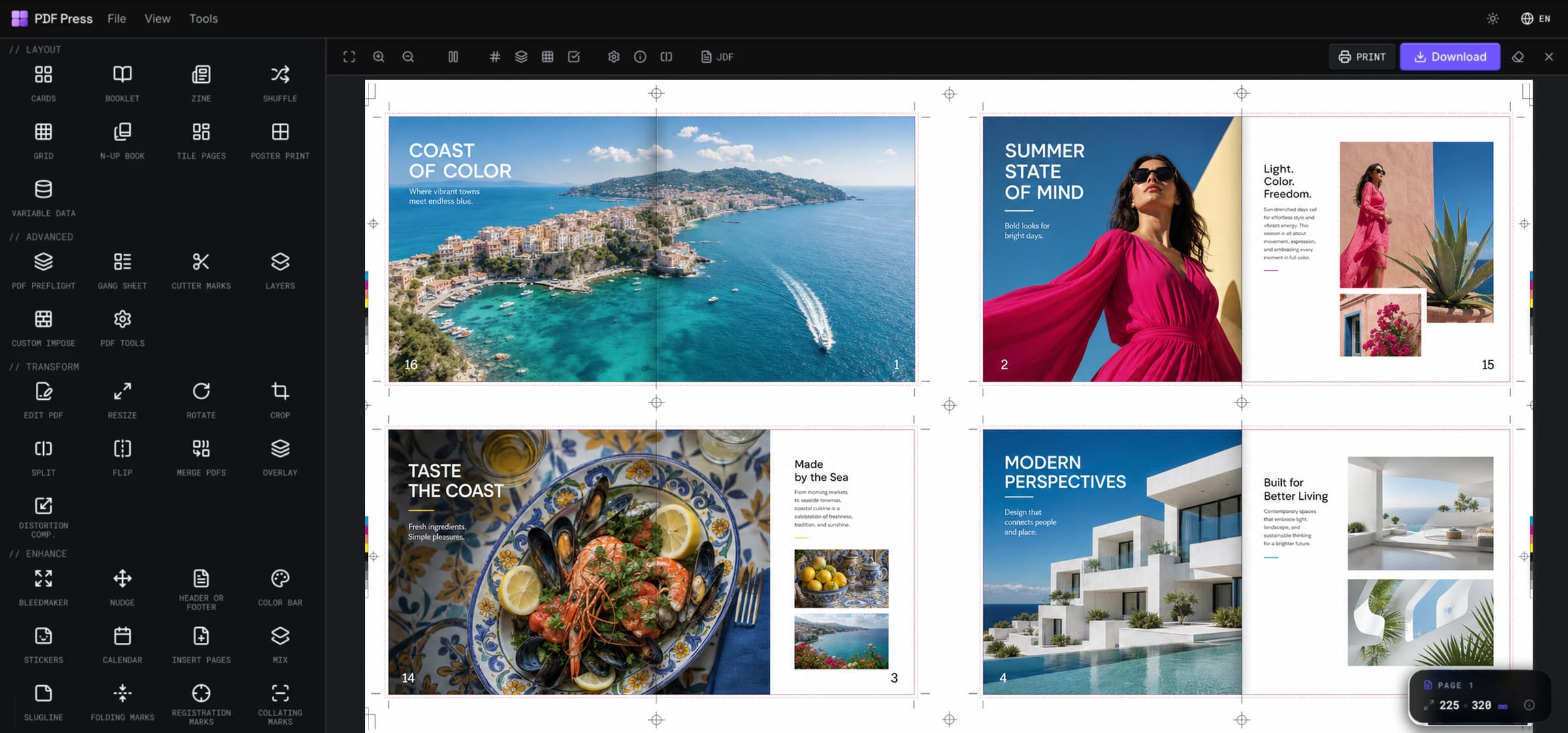
All your prepress tools. One workflow.
Preview real production jobs from booklet signatures and cut-and-stack tile pages to DTF gang sheets, marks, barcodes, repair, color, and finishing tools.
Turnany  PDFintoaprint-readypresssheet
  .Booklets
  ,n-upcards
  ,labels
  andgangsheets,imposedwithcropmarks,bleedsandcolorbars,rightinyourbrowser.Noinstalls,nowaiting
  .
.
70+ tools for every print production need
Search the production toolbox by job type, from imposition and tiling to preflight checks, finishing marks, repair, color, and variable data.

Save time
Automate hours of manual imposition work into seconds.

Reduce errors
Preview every sheet live before anything goes to press.

Print ready
Crop marks, bleeds and color bars - press-perfect output.

Access anywhere
Runs in your browser on Mac, Windows and Linux.

Your files, safe
Everything is processed locally. Nothing is uploaded.
Imposed by designers and print shops worldwide
PDFs imposed + tool usages
Ask AI to convert this to a 5 × 5 cm business card; lay these out 3 × 3 on the sheet; impose it as a saddle-stitch booklet; make a 4-up n-up layout; turn these pages into a folded zine; step & repeat my sticker sheet; add 3 mm bleed and crop marks; set the paper size to A3; build a custom imposition.
Built for every print job
From a corner copy shop to a packaging line, PDF Press imposes the layout each job needs and exports a print-ready PDF.
Print shops & copy centers
Impose booklets, N-up sheets and gang runs for any digital or offset press, with crop marks and creep handled automatically.
Imposition software
Event & venue organizers
Print numbered, QR-coded tickets, passes and wristbands straight from a spreadsheet with variable data printing.
Ticket printing
Label & sticker printers
Step-and-repeat one label across the whole sheet with exact gaps and cut marks, ready to die-cut.
Step & repeat
Design & marketing studios
Gang business cards, flyers and brochures many-up on a single sheet, trimmed clean and ready for the press.
Card imposition
Schools, churches & clubs
Turn programs, newsletters and orders of service into saddle-stitch booklets that fold and staple in the right order.
Booklet imposition
Zine & indie publishers
Fold an 8-page mini-zine from a single sheet. The pages reorder themselves, so one print, one fold and one cut is all it takes.
Make a zineHow to impose a PDF
To impose a PDF, you arrange its single pages onto a larger press sheet in the exact order and position your printer needs. PDF Press does it right in your browser: pick a layout, set marks and bleed, preview the sheet, and export a print-ready file.
Add your PDF
Open PDF Press in your browser and add the PDF or images you want to impose.
Choose an imposition layout
Pick booklet, N-up grid, or step & repeat to gang up cards, labels and stickers.
Set the sheet details
Choose page size, margins, gutters and bleed, and add crop, cut or registration marks.
Preview and export
Check the live press-sheet preview, fix the page order, then export a print-ready PDF, processed locally with nothing uploaded.
Loved by prepress and print teams
Designers, copy centres and print shops who moved to PDF Press from Quite Imposing, pdfsnake, Imposition Wizard and other desktop imposers.
We ran Quite Imposing on Acrobat for years. PDF Press does the same booklet and N-up impositions right in the browser, with no plug-in and no per-seat licence, and it's genuinely quicker to set up.
Best browser tool I've found for booklet printing. Saddle-stitch, perfect-bound signatures, automatic page imposition, and our zine and catalogue clients love the turnaround.
Moved our team over from pdfsnake. Same step-and-repeat and gang-up work, but the live preview means we catch creep and bleed problems before the plate, not after.
I print zines on a Risograph and the imposition was always the painful part. PDF Press lays out my zine pages for saddle-stitch booklet printing in seconds, page order, creep and all.
Imposing a saddle-stitched booklet used to be the part of prepress I dreaded. Now it's a layout dropdown and a live preview. Easily the easiest impose tool I've used.
We gang up sticker sheets all day. Drop the artwork, set the grid, add cut marks, and N-up sticker imposition that used to need an Illustrator script now takes one click.
I'd tried Imposition Wizard and Montax before this. PDF Press wins on speed. Open a tab, drop the PDF, and crop marks and bleed are already where I need them.
Grid printing for flyers and postcards is dead simple now. I set rows and columns and it n-ups the PDF onto the press sheet with bleed and registration marks ready for the printer.
The custom imposition options are why I stayed. Odd page sizes, mixed orientations, bespoke grids: PDF Press handles custom impose jobs my old tools just refused.
Popular imposition guides & tools
The tutorials, comparisons and free tools print pros reach for most — impose, add bleed, fold and print with confidence.
Free imposition software
Impose booklets, N-up and cards in your browser — no upload, no install, press-ready export processed locally.
Read the guideAdd bleed to PDF
Extend artwork past the trim edge with fixed or mirrored bleeds — turn a trim-size file print-ready in your browser.
Open the toolFree imposition software for Mac
Skip Windows-only plugins and risky downloads — impose booklets, N-up and gang sheets on Mac, free and in-browser.
Read the guideBest imposition software 2026
Compare 2026 tools for digital and offset: booklets, N-up, step-and-repeat, crop marks and automation.
Read the guideHow to impose a PDF
A step-by-step tutorial covering booklet, N-up and gang imposition for print-ready output with free online tools.
Read the guideCut & stack PDF
Order pages for cut-and-stack production so sequential tickets, coupons and forms collate correctly after cutting.
Open the toolStep & repeat PDF
Repeat one artwork across a press sheet for labels, cards, stickers and short-run print jobs.
Open the toolHow to make a zine
Half-fold, quarter-fold and 8-page mini zines with the correct page order and printer spreads. No install.
Read the guideTile a large-format PDF
Split a poster across many printable pages with overlap and margins, then print it on a home printer.
Read the guideImposition plugin for Acrobat?
Why there is no good free Acrobat plugin — and how to impose any PDF free in the browser with none at all.
Read the guideFree PDFSnake alternative
Browser-based, client-side imposition for booklets, N-up, step & repeat and gang sheets — no signup, no upload.
Read the guideReady when you are
Impose your next job in the browser
Drop in a PDF, pick a layout, and export a print-ready sheet with marks and bleed. No install, no upload, no account needed to start.
Frequently asked questions
How PDF Press compares to the imposition software market
An honest, scored look at PDF Press versus the major Acrobat plugins, desktop apps, online tools, and enterprise suites. Filter by category and see where each tool really lands.
| Feature | PDF PressBest choice | Quite Imposing Plus | Kodak Preps | EFI Fiery Impose | Adobe Acrobat Pro |
|---|---|---|---|---|---|
| 100% browser-based | |||||
| Nothing to install | |||||
| Works on Mac, Windows, Linux & Chromebook | Mac / Win | Mac / Win | Mac / Win | Mac / Win | |
| No Adobe Acrobat or plug-in required | |||||
| Booklets, N-up & step-and-repeat | |||||
| Crop, bleed & cutter marks | |||||
| Variable data printing | |||||
| 70+ production tools | 70+ | Limited | Limited | Limited | Basic |
| Automatic updates (no paid upgrades) | |||||
| Pricing | Free, then $120/yr | $949 + Acrobat | $$$$ | $$$$ | ~$240/yr |
Feature comparison based on each vendor's public product and pricing pages (checked 2026). PDF Press is our own product; competitor names are trademarks of their owners.